Compute
Compute Inventory
Servers
Mini PCs
GPU Workstations
Raspberry Pis
Laptops
Active Lab
This lab compute layer is built from dedicated servers, mini PCs, GPU systems, Raspberry Pis, laptops, and virtual infrastructure.
Core Server
Ryzen 9 7950X, 128 GB DDR5, RTX 5070, and 4 × 2 TB NVMe. Runs personal Active Directory, D&D app hosting, databases, and core infrastructure.
Red / Blue Virtualization Hosts
Dedicated Proxmox hosts for Red Team, Blue Team, victim, Windows, and Linux lab systems.
GPU Systems
Dedicated RTX 3060 and RTX 2060 systems for AI, security research, reverse engineering, and GPU-assisted workloads.
Endpoint Fleet
Mini PCs, Windows, Ubuntu, and CachyOS laptops and Surface devices used for endpoint testing, administration, and daily lab interaction.
Asset Inventory
High-level inventory for major lab systems. Sensitive details such as public IPs, exact firewall rules, and credentials are intentionally excluded.
| Host / Device |
Role |
OS / Platform |
CPU |
RAM |
GPU |
Storage |
VLAN / Zone |
Status |
| Core Server |
Core server, personal AD, D&D app, databases, and primary infrastructure |
Server infrastructure |
Ryzen 9 7950X, 16c/32t |
128 GB DDR5 |
NVIDIA RTX 5070 |
4 × 2 TB NVMe |
VLAN 10 / Management |
Active |
| Red Team Host |
Red Team Proxmox host for attacker systems and offensive lab VMs |
Proxmox |
Ryzen 7 8745HS |
32 GB DDR5 |
Integrated |
1 TB NVMe |
VLAN 20 / Red Team |
Active |
| Blue Team Host |
Blue Team / SOC Proxmox host for Security Onion and monitoring workloads |
Proxmox |
Intel i9-13900HK, 14c/20t |
32 GB DDR5 |
Integrated |
1 TB SSD |
VLAN 30 / Blue Team |
Active |
| AI Server |
AI server, Ollama, Open WebUI, Docker, GPU compute, and Hashcat lab use |
Ubuntu Server 24.04 LTS |
Intel i7 |
64 GB DDR4 |
NVIDIA RTX 3060 |
1 TB NVMe |
VLAN 10 / Management |
Planned |
| Research Workstation |
Security research, reverse engineering, digital forensics, and isolated lab VMs |
Windows 11 Pro |
Unknown |
32 GB DDR4 |
NVIDIA RTX 2060 |
2 TB NVMe |
VLAN 20 / Red Team |
Planned |
| Primary Raspberry Pi |
Passbolt, Pi-hole, Nginx, network alerts, and lightweight infrastructure services |
Raspberry Pi OS |
ARM |
16 GB |
None |
Unknown |
VLAN 10 / Management |
Active |
| Utility Raspberry Pi |
Utility Pi for backup DNS, monitoring, honeypot, or subnet-router use |
Raspberry Pi OS / TBD |
ARM |
8 GB |
None |
Unknown |
VLAN 10 / Management |
Available |
| Daily Mini PC |
Daily driver mini PC |
Windows / Linux |
Ryzen 5 3500U |
16 GB |
Integrated |
512 GB SSD |
Trusted endpoint |
Active |
| Work Mini PC |
Work / admin mini PC |
Windows |
Ryzen 5 3500U |
16 GB |
Integrated |
512 GB SSD |
Trusted endpoint |
Active |
| NAS / Backup Storage |
Central storage, VM backups, ISO library, shared files, and project backup storage |
UGREEN NAS OS |
Appliance |
Unknown |
None |
2 × 2 TB HDD + 1 × 2 TB NVMe |
VLAN 10 / Management |
Active |
| Endpoint Fleet |
Windows 11, Windows 10, Ubuntu, and CachyOS laptops / Surface systems |
Mixed |
Mixed |
12–16 GB |
Mixed |
Mixed |
Varies |
Available |
Purpose
- Practice enterprise infrastructure design in a controlled environment
- Run Windows, Linux, monitoring, and application workloads
- Support cybersecurity testing without disrupting production systems
- Document hands-on systems administration, networking, and security engineering experience
Hardware
GPU Compute and Research Systems
RTX 3060
RTX 20-Series
Ubuntu Server
Windows 11 Pro
Specialized Systems
The GPU systems are separated by role so each machine supports a specific lab function instead of duplicating existing virtualization infrastructure.
RTX 3060 System
- Public label: AI Server
- Planned OS: Ubuntu Server 24.04 LTS
- Hardware: Intel i7, 64 GB DDR4, NVIDIA RTX 3060, 1 TB NVMe
- Role: AI server, local model hosting, Docker workloads, GPU compute, and Hashcat lab use
- Planned services: Ollama, Open WebUI, Docker, SSH, monitoring agent
RTX 20-Series System
- Public label: Research Workstation
- Planned OS: Windows 11 Pro
- Hardware: CPU unknown, 32 GB DDR4, NVIDIA RTX 2060, 2 TB NVMe
- Role: security research workstation, reverse engineering, digital forensics, and malware-analysis lab work
- Planned tools: VMware Workstation Pro, FLARE-VM, Ghidra, x64dbg, Wireshark, Burp Suite, VS Code
- Network placement: VLAN 20 / Red Team or isolated research VLAN with restricted access to trusted services
Hardware
Endpoint and Admin Device Fleet
Windows 11
Windows 10
Ubuntu
CachyOS
Endpoint Testing
The endpoint fleet provides realistic client systems for administration, testing, troubleshooting, and domain/lab scenarios.
Windows 11 Laptops
Two 16 GB systems for endpoint testing, Windows administration, domain scenarios, and general lab workflows.
Windows 10 Laptop
12 GB system useful for legacy endpoint testing, compatibility checks, and client troubleshooting practice.
Ubuntu Laptop
12 GB Linux system for SSH, administration, scripting, Ansible, and Linux endpoint testing.
CachyOS Surface Pros
Older Surface Pro systems used as lightweight Linux admin, testing, or portable lab devices.
Infrastructure
Network Infrastructure
OPNsense
Cisco Catalyst
Ubiquiti
NAS
Core Network
Core network infrastructure supports routing, segmentation, switching, wireless access, and centralized storage for the lab.
OPNsense Firewall
Handles firewall policy, routing, VLAN segmentation, VPN access, and controlled inter-VLAN communication.
Cisco Catalyst 2960 48-Port Switch
Managed switching for VLANs, trunking, endpoint connectivity, and SPAN/mirrored traffic for monitoring visibility.
Ubiquiti U7 Access Point
Wireless access for trusted devices and lab administration without exposing sensitive network details publicly.
UGREEN 2-Bay NAS
Central storage with 2 × 2 TB HDD and 1 × 2 TB NVMe for VM backups, ISO storage, shared files, and project backups.
Infrastructure Purpose
- Provide segmented network access for lab, management, security, and endpoint systems
- Support realistic switching, VLAN, and firewall administration practice
- Centralize backup and file storage for lab workloads
- Give the environment a more complete enterprise-style network foundation
Network
Network Architecture
OPNsense
Cisco Switching
VLANs
Firewall Rules
Segmented
The lab network is designed around segmentation, controlled inter-VLAN access, monitoring visibility, and separation between production, lab, offensive, defensive, and IoT systems.
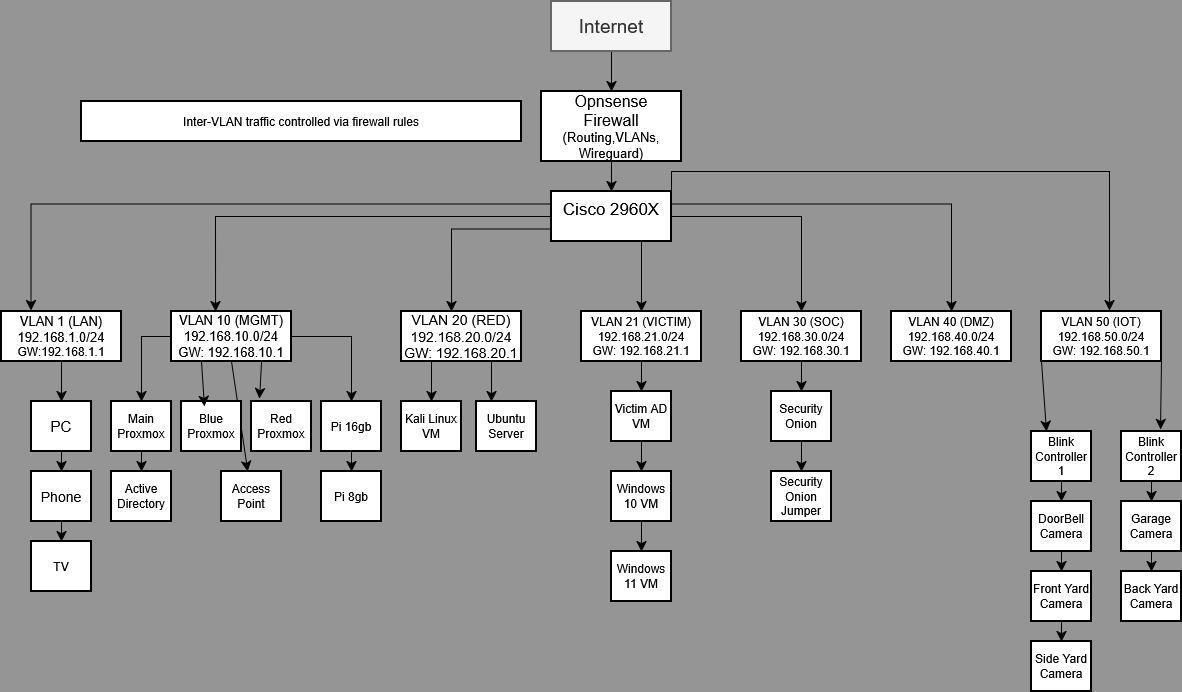
Network Summary
- OPNsense handles routing, VPN access, VLAN interfaces, and inter-VLAN firewall policy.
- Cisco Catalyst switching separates systems by trust boundary and lab function.
- The Ubiquiti U7 access point supports wireless access for trusted devices and lab administration.
- The UGREEN NAS provides centralized storage for VM backups, ISO files, shared lab storage, and project backups.
- Security Onion receives monitored traffic for alerting, visibility, and SOC-style investigation practice.
- Red Team, Victim, Blue Team, DMZ, IoT, LAN, and Management zones are separated instead of running as a flat network.
Internet
│
▼
OPNsense Firewall
│
▼
Managed Switch
├── VLAN 1 LAN / General Devices
├── VLAN 10 Management / Infrastructure
├── VLAN 20 Red Team / Research
├── VLAN 21 Victim Systems
├── VLAN 30 Blue Team / SOC
├── VLAN 40 DMZ / Public-Facing Lab Services
└── VLAN 50 IoT / Camera / Smart Devices
Design Goals
- Limit lateral movement between zones
- Keep production services separate from attack and victim systems
- Route and control traffic through firewall policies
- Provide visibility for monitoring and detection tools
Network
VLAN Segmentation Model
Management
Red Team
Victims
Blue Team
DMZ
IoT
Firewall Controlled
VLANs are used to organize systems by trust level and function. Traffic between zones is controlled through firewall rules instead of allowing flat network access.
Example VLAN Roles
- Management / Infrastructure: trusted administration, servers, and core services
- Red Team: Kali, research systems, attack tooling, and security testing workstations
- Victim: Windows and Linux targets used for lab scenarios
- Blue Team / SOC: Security Onion, monitoring, sensors, and investigation tools
- DMZ: exposed or semi-exposed services that should not directly trust internal systems
- IoT: cameras, smart devices, and lower-trust home network devices
Security Purpose
Segmentation allows the lab to simulate enterprise boundaries while reducing the risk of research, testing, vulnerable machines, or IoT systems reaching trusted infrastructure.
Services
Hosted Services
Active Directory
DNS
D&D App
Databases
Nginx
Production + Lab
These hosted services support personal infrastructure, application development, identity practice, DNS, databases, and lab workflows.
Active Directory
Personal domain services for Windows administration, identity practice, endpoint testing, and domain-based workflows.
D&D Application
Full-stack application environment supporting character tools, campaign systems, inventory, achievements, and backend database work.
Databases
Database-backed project infrastructure for application development, schema design, and backend systems practice.
Reverse Proxy
Nginx-based routing for internal services, application access, and controlled service exposure.
Services
Raspberry Pi Infrastructure
Pi-hole
Passbolt
Nginx
Alerts
Lightweight Services
Raspberry Pi systems provide lightweight supporting infrastructure for network services, password management, and alerting.
Primary Raspberry Pi
- Passbolt password manager
- Pi-hole DNS filtering
- Nginx reverse proxy services
- Network alerting and notifications
Secondary Raspberry Pi
- Available for backup DNS, monitoring, honeypot, Tailscale subnet routing, or lightweight utility services
Security
Blue Team Monitoring Environment
Security Onion
SOC
Detection
Traffic Analysis
Defensive Security
The Blue Team environment provides visibility into lab activity and supports investigation practice across security events, alerts, and network traffic.
Capabilities
- Security Onion monitoring and alert review
- Traffic visibility for lab networks
- Detection practice from attack and victim scenarios
- SOC-style investigation workflows
- Future expansion for Wazuh, Grafana, Loki, or centralized observability
Current Focus
Expanding centralized monitoring, log aggregation, and detection engineering through Security Onion while documenting SOC-style investigation and incident response workflows.
Security
Red Team and Research Environment
Kali
Windows Research
Burp Suite
Reverse Engineering
Controlled Lab Use
The Red Team environment is used for authorized lab testing, attack simulation, web application testing, reverse engineering practice, and defensive validation.
Systems and Tools
- Kali Linux for security testing within the lab
- Windows 11 Pro research workstation on the RTX 20-series system
- VMware Workstation Pro for isolated research VMs
- FLARE-VM, Ghidra, x64dbg, Wireshark, Burp Suite, and VS Code
- Victim systems isolated on dedicated lab networks
Research Focus
Used to validate defensive controls, analyze software, practice reverse engineering, and improve detection capabilities in an isolated lab environment.
Roadmap
Planned Lab Improvements
Documentation
Monitoring
Automation
AI
In Progress
The lab roadmap focuses on making the environment easier to manage, monitor, rebuild, and explain as a professional portfolio project.
Next Priorities
- Maintain a complete hardware and service inventory on this page
- Build a clean network diagram for the website
- Add monitoring dashboards for hosts, services, and network health
- Deploy the RTX 3060 Ubuntu AI server with Ollama and Open WebUI
- Deploy the RTX 20-series Windows research workstation
- Document firewall segmentation and lab access rules at a safe, high level
- Explore Ansible or Terraform for repeatable lab deployment
Portfolio Goal
Present the homelab as proof of practical experience with virtualization, networking, Windows administration, Linux systems, monitoring, application hosting, and security operations.