Cybersecurity labs, infrastructure builds, app development, and portfolio work organized in an app-style project dashboard.
Total Projects7
Active Builds6
FocusSecurity / Infrastructure / Dev
Categories
Graduate Research • In Progress
Master’s Thesis — Network Segmentation & Credential-Based Lateral Movement
ResearchActive DirectoryOPNsenseSecurity OnionGRC
Featured Project
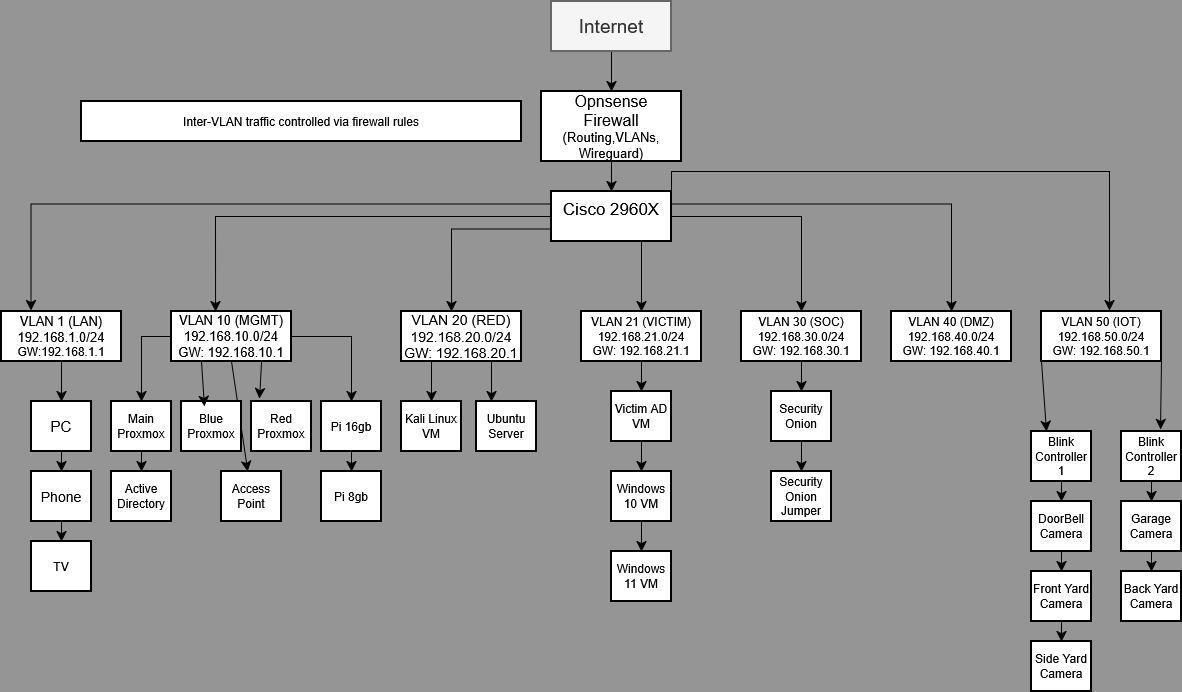
This controlled technical study evaluates whether VLAN-based segmentation and least-privilege inter-VLAN firewall rules reduce credential-based lateral movement in a simulated municipal Active Directory environment while maintaining useful monitoring visibility.
Research Question
To what extent does VLAN-based network segmentation with least-privilege inter-VLAN access control reduce successful credential-based lateral movement compared with a flatter network design in a controlled Active Directory cyber range?
Current Status
Research scope and technical direction defined
Existing Red, Blue, Victim, and infrastructure lab being documented
Security Onion, Zeek, and Suricata visibility being validated
Experiment run sheet and evidence structure in development
Study Design
Baseline condition: a flatter network with broader reachability between selected systems.
Experimental condition: segmented VLANs with explicit least-privilege OPNsense rules.
Attack scenario: controlled credential-based lateral movement, including Pass-the-Hash where appropriate.
Primary measurements: reachable services, successful and blocked movement attempts, detection outcome, alert timing, and detection latency.
Repetition: multiple standardized runs under each condition using restored snapshots and documented procedures.
Technical Environment
Proxmox virtualization hosts and isolated virtual machines
Windows Server Active Directory and Windows 11 victim endpoints
OPNsense routing, VLANs, firewall rules, and trust boundaries
Security Onion with Zeek and Suricata monitoring
Kali Linux / Red Team system for controlled testing
Windows event logs, network telemetry, and packet evidence
This companion security program uses the same controlled environment and evidence to connect technical testing with governance, risk management, incident response, security operations, resilience, compliance mapping, and assurance.
Foundation & Architecture
Project charter, organization profile, scope, assumptions, and boundaries
VM and network asset inventory
Current-state flat network diagram
Target segmented network diagram
System categorization and data-classification matrix
Business impact analysis for core services
Risk Management
Risk-assessment methodology and scoring scales
Risk register with treatment and residual-risk fields
Risk treatment plan
NIST CSF 2.0 current and target profile
Risk-acceptance and security-exception forms
Governance Policies & Standards
Information Security Policy
Network Segmentation Standard
Access Control Policy
Logging and Monitoring Standard
Vulnerability and Patch Management Standard
Change Management Procedure and change-ticket template
Backup and Recovery Policy
Incident Response
Incident Response Plan
Incident severity, declaration, roles, escalation, and notification matrix
Evidence-handling procedure and chain-of-custody form
Credential Theft and Lateral Movement Playbook
Containment, eradication, recovery, timeline, and lessons-learned templates
Security Operations
Security Onion alert-triage procedure
Zeek, Suricata, Windows, and OPNsense investigation guide
Alert-severity matrix
Detection use-case catalog
Daily and weekly monitoring checklists
False-positive log and case-management template
Testing & Assurance
Security test plan and rules of engagement
Test-case matrix, pretest checklist, and evidence log
Pilot-trial summary and deviation records
Findings register and POA&M/corrective-action tracker
Control-effectiveness assessment
Retest report and final residual-risk decisions
Business Continuity & Disaster Recovery
Combined Business Continuity and Disaster Recovery Plan
RTO/RPO worksheet and recovery-priority matrix
Backup schedule and restoration checklist
Backup-testing procedure and recovery-test report
Credential-compromise tabletop exercise and after-action report
This section will present validated findings from repeated testing, including reachable-service counts, successful versus blocked attempts, alert coverage, and detection-latency comparisons.
Limitations & Ethical Boundaries
All testing occurs in an isolated, controlled cyber range.
No production organization, employee, resident, or real municipal network is used as a research subject.
Results apply to the defined lab design, tools, configurations, and attack scenarios.
Active Lab
Enterprise Segmented Cybersecurity Homelab
CybersecurityVLANsSecurity OnionActive Directory
Core Project
Designed and built a segmented cybersecurity homelab to simulate enterprise network architecture and real-world attack and defense scenarios.
Technologies Used
Proxmox multi-node virtualization
OPNsense firewall, routing, VPN, and VLAN policies
Security Onion monitoring and detection
Active Directory and Windows endpoint environment
Kali Linux offensive testing system
Pi-hole DNS and WireGuard remote access
Cisco switching and SPAN traffic monitoring
Explore the Full Homelab
This project is part of a much larger enterprise-style cybersecurity
homelab featuring multiple servers, segmented VLANs, Active Directory,
virtualization, AI infrastructure, security monitoring, and hosted
services.
This project strengthened my understanding of segmentation, firewall policy design, traffic flow, monitoring visibility, trust boundaries, and how defensive tools observe attacker behavior.
Monitoring
Security Onion Monitoring Environment
SOCZeekSuricataSPAN
SOC Lab
Deployed Security Onion to observe segmented lab traffic and practice SOC workflows including alert review, event investigation, packet visibility, and traffic analysis.
What I Did
Installed and configured Security Onion in the lab
Configured management and monitoring interfaces
Used mirrored traffic from selected VLANs
Reviewed dashboards, alerts, packet capture, and logs
Troubleshot interface, SPAN, and visibility issues
Security Onion dashboard1 / 3
Firewall
OPNsense Firewall & VLAN Policy Design
OPNsenseFirewall RulesVLANsWireGuard
Security Control
Designed firewall rules to control inter-VLAN traffic, restrict lateral movement, route segmented networks, and support VPN access into the lab.
What I Did
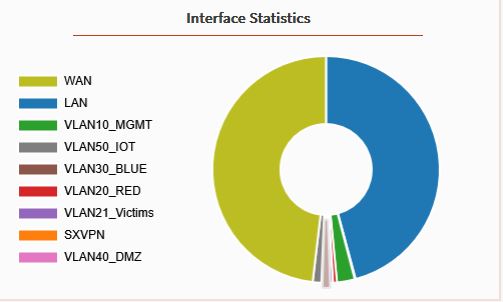
Created segmented VLAN interfaces
Built allow/deny policies between lab zones
Controlled Red Team, Victim, SOC, DMZ, IoT, and Management traffic
Troubleshot DNS, routing, and connectivity issues
Used rules to simulate enterprise trust boundaries
OPNsense VLAN interfaces1 / 2
Infrastructure
Proxmox Multi-Node Virtualization Lab
ProxmoxVirtualizationBridgesInfrastructure
Infrastructure
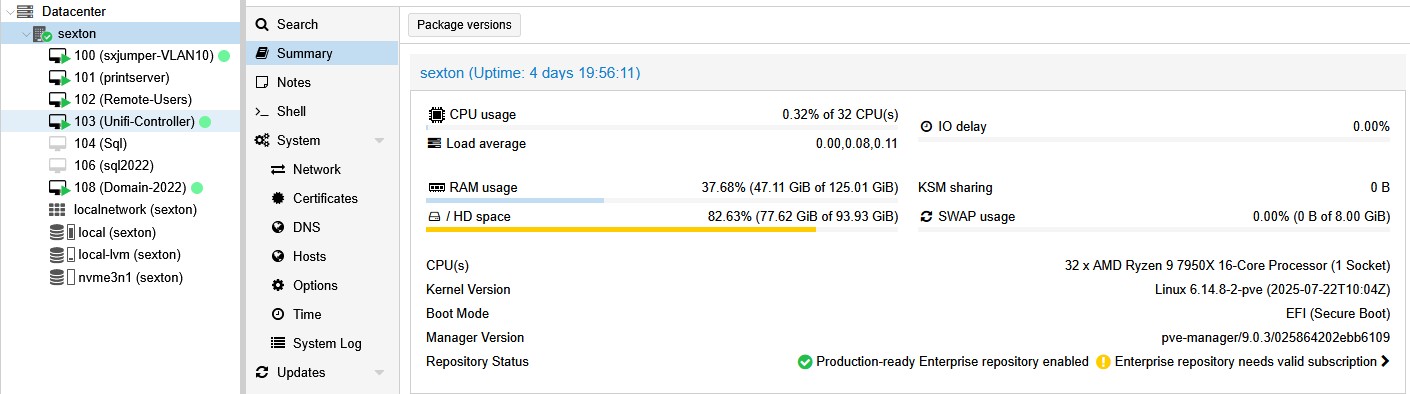
Built and managed a Proxmox-based virtualization environment to host attacker systems, victim machines, monitoring tools, infrastructure services, and lab networks.
What I Did
Configured multiple Proxmox hosts for lab workloads
Created virtual networks and VLAN-aware bridges
Separated infrastructure, Red Team, Blue Team, and victim workloads
Hosted Windows Server, Windows clients, Linux systems, Kali, and monitoring tools
Proxmox infrastructure host1 / 3
Active Development
D&D Campaign Management App
Next.jsSupabasePostgreSQLTypeScript
Full-Stack
Built a custom full-stack D&D 5.5 / 2024 application focused on campaign management, character creation, character sheets, inventory, spells, features, achievements, and database-driven automation.
What I Did
Designed and built a multi-step character creator
Created database-backed systems for species, classes, backgrounds, spells, inventory, equipment, and features
Built app-style UI screens for achievements, characters, campaign tools, and progression systems
Worked through schema migrations, permission issues, frontend bugs, and data consistency problems
Results
This project demonstrates full-stack development, database design, complex rule modeling, debugging, UI organization, and long-term project ownership.
D&D App Section
Dashboard & Interface
UI/UXNavigationDashboardPlayer Hub
Interface
The dashboard acts as the central hub for the application, giving users access to characters, campaign tools, achievements, progression systems, and app navigation.
What This Shows
App-style interface design
Organized navigation between major systems
Player-focused layout for campaign tools and progression
Visual consistency across the app
D&D App Section
Account & Profile
User AccountsProfilesCosmeticsSettings
User System
Account and profile functionality supports user identity, personalization, profile editing, and future cosmetic progression such as equipped titles and dashboard backgrounds.
What I Built / Planned
User profile structure tied to saved characters and campaign ownership
Profile customization support for titles, cosmetics, and backgrounds
Foundation for achievement reward unlocks
Account-aware user flows across protected app areas
D&D App Section
Character Creator
Wizard FlowValidationRules LogicCharacter Data
Core System
A multi-step character creation system for building characters through species, class, background, ability scores, language choices, equipment, and spells.
Features
Step-by-step creation flow
Species, class, and background selection
Ability score assignment and validation
Starting equipment and spell selection logic
Database-backed options instead of hardcoded assumptions
Why It Matters
This section demonstrates complex frontend state management, database-driven content, validation logic, and the ability to translate tabletop rules into structured application workflows.
D&D App Section
My Characters
Character ManagementSaved DataPlayer Tools
Player Hub
The My Characters section lets users open, review, and manage their saved characters from one central place.
What This Shows
Saved character ownership
Character listing and management workflows
Navigation into detailed character sheets
Foundation for campaign assignment and player-facing tools
D&D App Section
Character Sheet
Player ToolsInventoryActionsAutomation
Player System
The character sheet is the player-facing hub for viewing character data, actions, defenses, features, inventory, spells, and progression-related information.
Features
Character stats, features, senses, defenses, and resources
Inventory and equipment display
Spell and action sections
Foundation for future automation such as spell slots, rests, resources, and combat actions
D&D App Section
Campaigns
CampaignsShared AdventuresProgress
Campaign System
The Campaigns section supports joining campaigns, tracking progress, and managing shared adventures between players and the DM.
What This Shows
Campaign-level organization
Shared player/DM spaces
Future campaign progress tracking
Relationship between users, characters, and campaigns
D&D App Section
Achievement System
ProgressionRewardsCosmeticsUnlocks
Gamification
A progression and reward system that tracks achievement categories, points, unlocks, rewards, cosmetics, and player milestones.
Features
Achievement categories and progress tracking
Reward and cosmetic unlock support
Points-based progression
Designed for future automatic triggers from gameplay events
D&D App Section
Library
ReferenceRulesSpellsBooks
Reference System
The Library provides access to books, rules, spells, and reference material used throughout the app.
What This Shows
Centralized rules/reference access
Foundation for spell browsing and filtering
Reusable data across character tools and gameplay systems
Foundation for campaign controls, chat tools, initiative, and encounter support
D&D App Section
Inventory System
InventoryEquipmentContainersItems
Item Logic
The Inventory System handles character items, equipment, containers, weapons, armor, and item movement between characters or storage.
What This Shows
Equipment and item organization
Container-aware item storage
Foundation for ammunition, quivers, stores, loot, and crafting
Complex item rules represented in application logic
D&D App Section
Spell System
SpellsSlotsPreparedRules
Rules Logic
The Spell System supports spell data, spell display, character spell access, and the foundation for spellcasting automation.
What This Shows
Spell library and character spell display
Class-based spell logic
Foundation for spell slots, casting, healing, damage, buffs, and targeting
Database-driven spell rules instead of static hardcoding
D&D App Section
Supabase Database
SupabasePostgreSQLSchema DesignPermissions
Backend
The backend uses Supabase and PostgreSQL to store character data, rules content, items, spells, features, achievements, campaign data, and application state.
What This Shows
Database-backed app architecture
Schema design for complex game rules and player data
Permission troubleshooting and migrations
Long-term data organization across many related systems
Why It Matters
This section demonstrates backend thinking, database modeling, debugging, and the ability to build a system that can grow over time instead of relying only on static frontend data.
D&D App Section
Authentication & Permissions
AuthPermissionsProtected RoutesOwnership
Security
Authentication and permissions protect user data, support account-specific character ownership, and create role-aware access for player and DM features.
What This Shows
User authentication and session-aware app behavior
Protected routes and account-owned data
Role-aware separation between player and DM tools
Permission troubleshooting across frontend and Supabase backend
Portfolio
Notxes Portfolio Website
HTMLCSSPortfolioBranding
Professional
Built and maintained a personal portfolio website to present cybersecurity projects, education, technical skills, and professional experience.
Purpose
The site gives employers a clear view of practical technical work, including cybersecurity labs, infrastructure projects, application development, and career progress.